Is there any other way to do this step? I’m not getting a .bin file created. As I understand it, I need to update Klipper, but on my printer Klipper can’t be updated)

🇷🇺 Оригинал
А можно этот пункт сделать каким то другим способом? У меня не создается файл .bin, как я понял надо обновить клиппер, а на моем принтере нельзя обновить клиппер)
What printer is it? [iz chata]
🇷🇺 Оригинал
Что за принтер? [iz chata]
Is the firmware locked down there? I don’t know much about it… And what version of Klipper is installed there?
You can also run Catapult under WSL using basically the same approach
https://github.com/pavluchenkor/iHeater/tree/main/User-mods/software/WSL2_Ubuntu_FF
Questions about this method should go to @Kekht (https://t.me/Kekht)
But can you compile the Klpper firmware?
🇷🇺 Оригинал
Там закрытая прошивка? Я не в курсе про него… И какая версия клиппер там стоит?
Катапульту можно под wsl по такому же принципу
https://github.com/pavluchenkor/iHeater/tree/main/User-mods/software/WSL2_Ubuntu_FF
Вопросы по этому способу к @Kekht (https://t.me/Kekht)
Но скомпилировать прошивку Klpper можно?
Yeah, a uf2 file
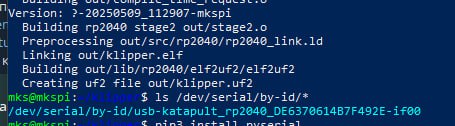
If only I knew how to check that) m115 says this:D It’s locked down; there is an option to install an open version, but I haven’t done it yet

🇷🇺 Оригинал
Да, файл uf2
Знал бы я как это узнать) m115 говорит так:D Закрытая, вариант поставить открытую есть, но я пока не ставил
It’s not going to make a bin file, just do it like here
https://docs.idryer.org/iDryer-Unit/firmware/#klipper
it’ll make a uf2, and this command with the serial number will do the rest
python3 flashtool.py -d

🇷🇺 Оригинал
оно и не будет bin делать, просто делай как тут
https://docs.idryer.org/iDryer-Unit/firmware/#klipper
оно сделает uf2 и эта команда с серийником сделает все
python3 flashtool.py -d
It’s asking for a bin
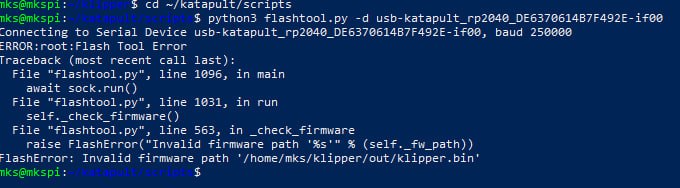
That’s what I posted above too, that it creates it as a uf2
🇷🇺 Оригинал
Он просит бин
Я вот и выше кидал, что он создает в виде uf2
Is that Klipper from Elegoo? How up to date is it?
Try pulling a vanilla one into a separate directory and compile under that
because the Elegoo one might be pretty old (which is pretty common for Chinese brands), and maybe it doesn’t fully have everything for the RP2040
🇷🇺 Оригинал
это который клиппер? От элегу? Насколько свежий?
Попробуй в отдельную директорию стянуть ванильный и под ним скомпилить
потому что возможно элегушный довольно старый (что вполне обычно для китайцев) и не в полной мере все для пишки 2040 есть
Yeah, Elegoo, and I don’t know how to check the version) It is old, yeah
🇷🇺 Оригинал
Да, элегу, а я не знаю как посмотреть версию) Он старый да
Well, if you really want the version and it’s somewhere on GitHub, then only by the commit hash (commit identifier). Or by the commit timestamps. But first, try what I wrote above
🇷🇺 Оригинал
Ну если прям интересна версия и он где-то на гитхабе - то по хэшу (идентификатору_ коммита только. Ну или по времени коммитов. Но для начала попробуй то что я выше написал
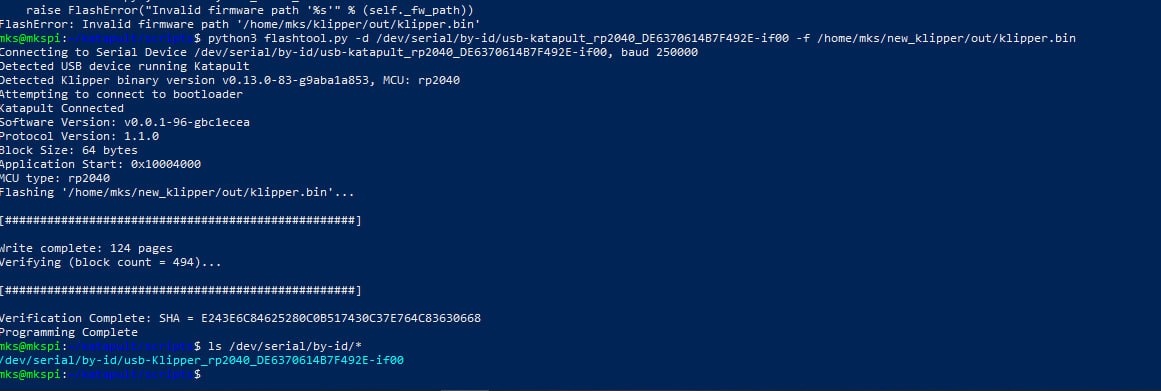
Looks like it worked, thanks
🇷🇺 Оригинал
Кажись получилось, спасибо
The main question here is how well the control side of Elegoo’s Klipper version will be able to work with the part controlled by vanilla… But I honestly don’t get why stay on Elegoo’s Klipper at all; as far as I know you can install a fresh one without problems
🇷🇺 Оригинал
Туи главный вопрос в том, насколько хорошо управляющая часть элегушной версии клиппера сможет работать с управляемой от ванильного… Но я вообще не понимаю зачем оставаться на элегушном клиппере, там же вроде без проблем можно свежий поставить
I haven’t been using the printer for very long, so I just didn’t need it yet, and as they say, if it works, don’t touch it)
🇷🇺 Оригинал
Да я не очень давно пользуюсь принтером, пока было не надо, а как говорится, работает - не трогай)